IT departments are under more pressure than ever. Between rising software costs, expanding infrastructure, and the shift to cloud-heavy environments, tech budgets can balloon fast, especially when growth outpaces governance. But cutting costs blindly isn’t the answer.
The goal isn’t to slash budgets and hope for the best. It’s to reduce waste, improve efficiency, and redirect spending to initiatives that drive business value. The most effective IT cost reduction strategies don’t compromise performance, security, or innovation.
They focus on optimizing what’s already in place, automating where possible, and ensuring every dollar spent supports long-term scalability. Are you struggling to control rising IT costs? Streamline your tech operations with more innovative strategies that cut waste, not performance. Are you struggling to control rising IT costs Simplify your tech stack with Adivi’s IT services, designed to boost performance and eliminate inefficiencies.

Key Takeaways
- Cut waste, not value, optimize IT spend for long-term efficiency.
- Cloud services are often overscaled; rightsizing can save a significant amount.
- Audit software licenses regularly to eliminate unused tools and optimize resource allocation.
- Automate routine tasks to lower operational costs.
- Review and renegotiate vendor contracts for better pricing.
- Utilize virtualization to minimize hardware and maintenance costs.
- Avoid cuts that weaken security or hinder innovation.
- Track ROI and cost metrics to guide smarter decisions.
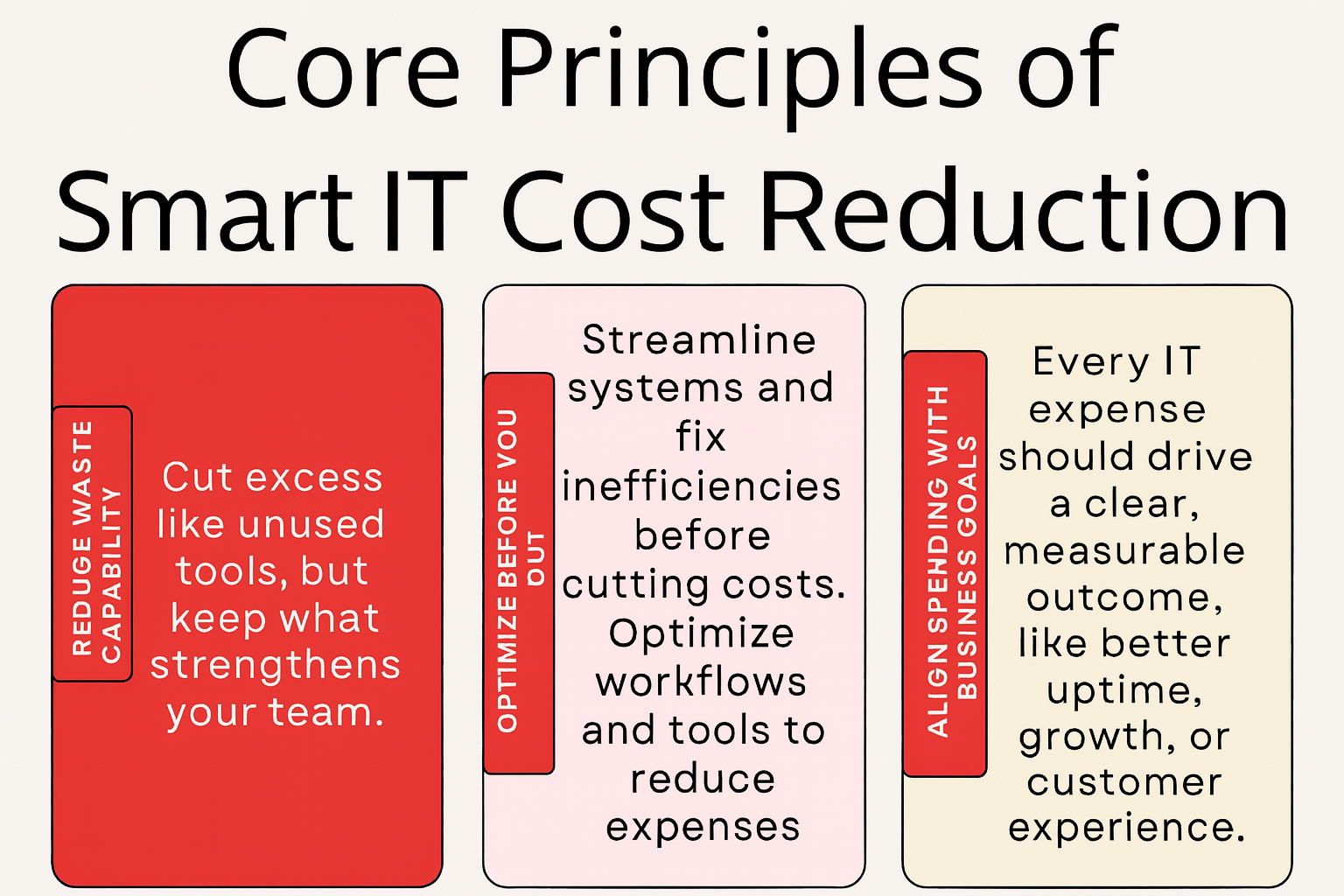
Core Principles of Smart IT Cost Reduction
Smart IT cost reduction focuses on eliminating waste without sacrificing performance. It means spending with purpose, choosing scalable solutions, automating repetitive work, auditing regularly, and reinvesting savings into innovation and growth. Explore the key benefits of modern IT services that make this possible.
Reduce waste, not capability
Focus on cutting excess without weakening your team’s performance. Cut what’s unnecessary, like unused licenses or redundant tools, but preserve the systems, skills, and infrastructure that keep your operations strong.
Optimize before you cut
Streamline systems and processes first, then reduce costs. Before slashing budgets, improve efficiency. Streamline workflows, consolidate platforms, and fix bottlenecks to minimize expenses without disruption.
Align spending with business goals
Ensure every IT expense supports a measurable outcome. Every dollar spent on IT should serve a clear purpose, whether that’s improving customer experience, increasing uptime, or enabling future growth.
5 IT Cost Reduction Strategies That Actually Work
Cutting IT costs doesn’t require sacrificing performance or security. This guide reveals five practical strategies to reduce waste, optimize resources, and support growth, backed by Gartner-backed strategies for reducing IT costs effectively.
- Audit and Eliminate Unused Software
Regularly review software usage to identify underused licenses and redundant tools. Cancel or consolidate them to avoid paying for what you’re not using.
Regularly audit software to identify unused or redundant tools, reduce licensing costs, minimize security risks, and simplify your tech stack. Reinvest the savings into critical IT initiatives that support performance, innovation, and long-term growth.
Unused or underutilized software silently drains budgets. Regular audits help uncover licenses, subscriptions, and applications that are no longer needed, duplicated across teams, or delivering minimal value.
Why it’s important:
- Reduces unnecessary costs: Eliminating unused tools can save thousands annually.
- Improves security: Fewer tools mean fewer potential vulnerabilities and access points.
- Streamlines operations: Reduces tech clutter, making systems easier to manage and maintain.
- Enhances productivity: Employees stick to core tools that are supported and optimized.
Tips for success:
Track usage data across departments with license management tools.
Set periodic review cycles (e.g., quarterly) to reassess tool relevance.
Decommission or consolidate overlapping tools where possible.
Reallocate freed-up budget to critical initiatives or modern solutions.
- Optimize Cloud Spend
Use tools to monitor cloud usage and rightsize resources. Turn off idle instances, adopt auto-scaling, and shift workloads to lower-cost options, such as spot or reserved instances.
Optimize cloud spend by eliminating idle resources, right-sizing workloads, and using reserved instances or savings plans. Enable auto-scaling to match demand, and track usage with cost management tools. Small changes can unlock major savings without sacrificing performance.
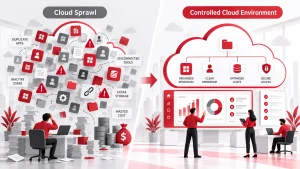
Cloud costs can spiral quickly without proper oversight. Focus on usage-based billing, right-sizing resources, and eliminating idle instances to avoid waste.
Why it matters:
- Prevent overprovisioning: Many organizations pay for more storage or compute than they use.
- Eliminate idle resources: Shut down unused virtual machines, storage, or test environments.
- Use reserved instances or savings plans: Commit to long-term usage for better rates.
- Leverage auto-scaling: Adjust resources dynamically based on demand.
- Monitor with cost management tools: Track usage, set budgets, and receive alerts to stay in control.
- Automate Repetitive Tasks
Implement automation for routine IT processes, such as provisioning, patching, and support ticket triage. This reduces labor costs and speeds up operations.
Automating repetitive IT tasks—like software updates, backups, and user provisioning—saves time, reduces human error, and boosts productivity. It frees your team to focus on higher-value work and improves consistency across systems. Over time, automation reduces labor costs and accelerates service delivery.
Why it matters:
- Frees Up Time: Your team stops wasting hours on low-value, manual tasks. That time can be redirected toward strategic initiatives or complex problem-solving.
- Reduces Human Error: Repetitive tasks are prone to mistakes when done manually. Automation ensures consistency and accuracy every time.
- Improves Efficiency at Scale: As your business grows, the volume of repetitive tasks increases. Automation handles this workload instantly without needing more staff.
- Enables Faster Response Times: Whether it’s approving access, resolving tickets, or generating reports, automation speeds up processes that normally lag.
- Supports Business Continuity: Automated tasks don’t rely on someone being present or available. Processes run 24/7, reducing risk and downtime.
- Renegotiate Vendor Contracts
Don’t wait for renewals—review contracts regularly. Compare market rates, negotiate discounts, or switch vendors to secure better terms and bundled services
Review vendor contracts regularly to identify opportunities for better pricing, bundled services, or flexible terms. Use usage data and competitor benchmarks to negotiate from a position of strength. Even small adjustments can lead to substantial long-term savings and improved service levels.
Why it matters:
- Lower Costs: Vendors are often open to discounts or volume-based pricing, especially if you’ve been a long-term customer or bring consistent business.
- Eliminate Unused Services: You may be paying for features or licenses you no longer use. Renegotiating helps trim the excess.
- Improve SLAs (Service Level Agreements): A contract refresh can align vendor accountability with your current operational needs and expectations.
- Adapt to Changing Needs: As your business evolves, so do your requirements. Renegotiation ensures your contracts reflect current realities, not outdated assumptions.
- Gain Flexibility: Modernized terms can reduce lock-in periods, give you more room to scale, or improve exit clauses.
- Virtualize and Consolidate Infrastructure
Reduce physical hardware by using virtualization and containerization. This reduces energy costs, maintenance, and data center space requirements while enhancing scalability.
This maximizes resource usage, lowers energy consumption, and simplifies management. It also increases flexibility, allowing IT to scale more efficiently and respond faster to business needs.
Replacing physical hardware with virtual machines (VMs) and combining multiple systems onto fewer, more efficient servers or platforms.
Why it matters:
- Reduces Hardware and Maintenance Costs: Fewer physical machines mean less spending on equipment, power, cooling, and maintenance.
- Maximizes Resource Usage: Virtualization increases server utilization rates, so you’re no longer running underused hardware.
- Simplifies Management: Consolidated systems are easier to monitor, secure, and maintain, especially with centralized tools.
- Improves Scalability: Need more capacity? You can spin up new virtual servers in minutes instead of waiting for physical hardware.
- Enhances Disaster Recovery: Virtual machines can be backed up, replicated, and restored faster, improving business continuity during outages.
Common IT Cost Reduction Mistakes to Avoid
Reducing IT expenses is essential, but cutting costs the wrong way can lead to performance issues, security risks, and long-term inefficiencies. Avoid these common pitfalls and understand how disaster recovery planning fits into cost-efficient IT strategy to ensure your cost-saving efforts support, not harm, your business.

- Cutting critical services: Removing essential tools or systems can disrupt operations and weaken security.
- Focusing only on short-term savings: Quick fixes may backfire if they ignore scalability or future needs.
- Overlooking hidden costs: Unchecked cloud usage, licensing fees, or vendor lock-ins can drain your budget.
- Neglecting staff training: Without proper training, teams may misuse tools, which reduces productivity and increases support costs.
- Failing to align IT cuts with business goals: Random reductions can cause disconnects between tech and strategy, slowing progress.
Conclusion
IT cost reduction should enhance, not hinder, performance and growth. Focus on repeatable, strategies for making smarter, data-driven IT decisions. Done right, these changes lead to stronger, more scalable tech operations.
Because effective IT cost reduction isn’t about cutting corners, it’s about spending smarter. Focus on strategies that enhance efficiency, minimize waste, and foster long-term growth.
And if you need or want to explore the right one, visit Adivi, which offers expert-driven solutions to streamline your infrastructure, optimize spend, and drive sustainable growth.
FAQ’s
What is the most effective IT cost reduction strategy?
The most effective strategy depends on your environment, but cloud optimization and eliminating unused software licenses often deliver the fastest and most measurable savings.
How can I reduce IT costs without impacting performance?
Focus on optimization rather than cuts, automate routine tasks, rightsize cloud resources, and consolidate infrastructure to improve efficiency while maintaining service quality.
Is switching vendors a good way to cut IT costs?
Yes, reviewing and renegotiating vendor contracts or switching to more cost-effective providers can lead to significant savings, especially when services are consolidated or terms are renegotiated.
How do I know if my IT cost reduction strategy is working?
Track key performance indicators (KPIs) like cost per user, cloud spend by workload, and ROI from infrastructure investments to measure the effectiveness of your cost reduction efforts.