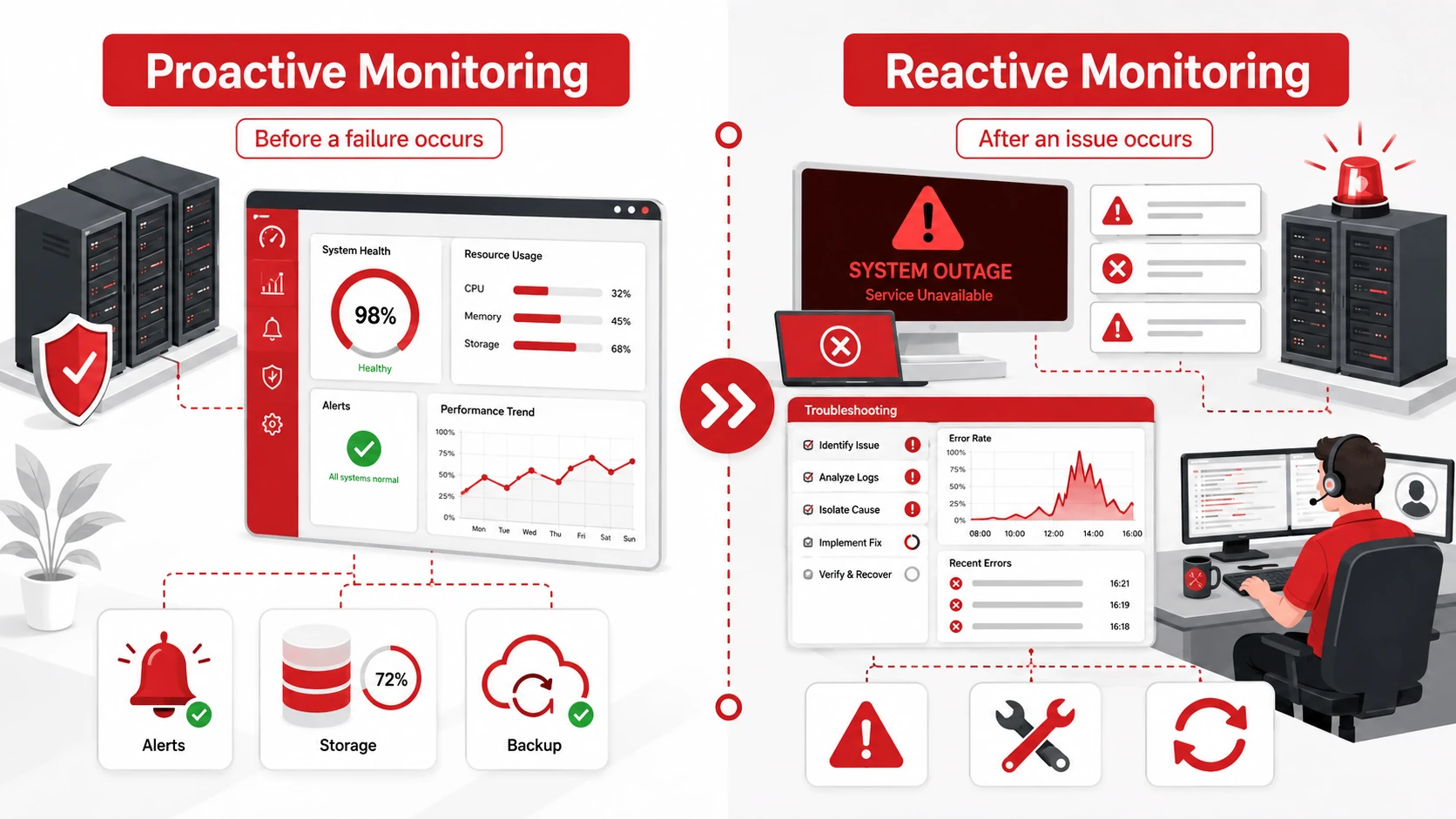
Proactive monitoring looks for warning signs before a system fails, while reactive monitoring detects and investigates problems after they have already occurred.
Both approaches are important in business IT. Proactive monitoring helps identify performance issues, security risks, backup failures, and equipment problems early. Reactive monitoring helps IT teams understand active incidents and determine the appropriate response.
The main difference is timing. One aims to prevent disruption, while the other helps restore normal operations when an unexpected problem occurs.
Proactive vs. Reactive Monitoring at a Glance
| Feature | Proactive Monitoring | Reactive Monitoring |
| Timing | Before a failure occurs | After an issue occurs |
| Main purpose | Detect and prevent problems | Investigate active problems |
| Common activities | Performance tracking, alerts and capacity monitoring | Incident detection, diagnosis and troubleshooting |
| Main advantage | Reduces avoidable downtime | Addresses unexpected incidents |
| Main limitation | Requires continuous tools and oversight | Users may already be affected |
| Best use | Routine system management | Active incident response and recovery |
What Is Proactive Monitoring?
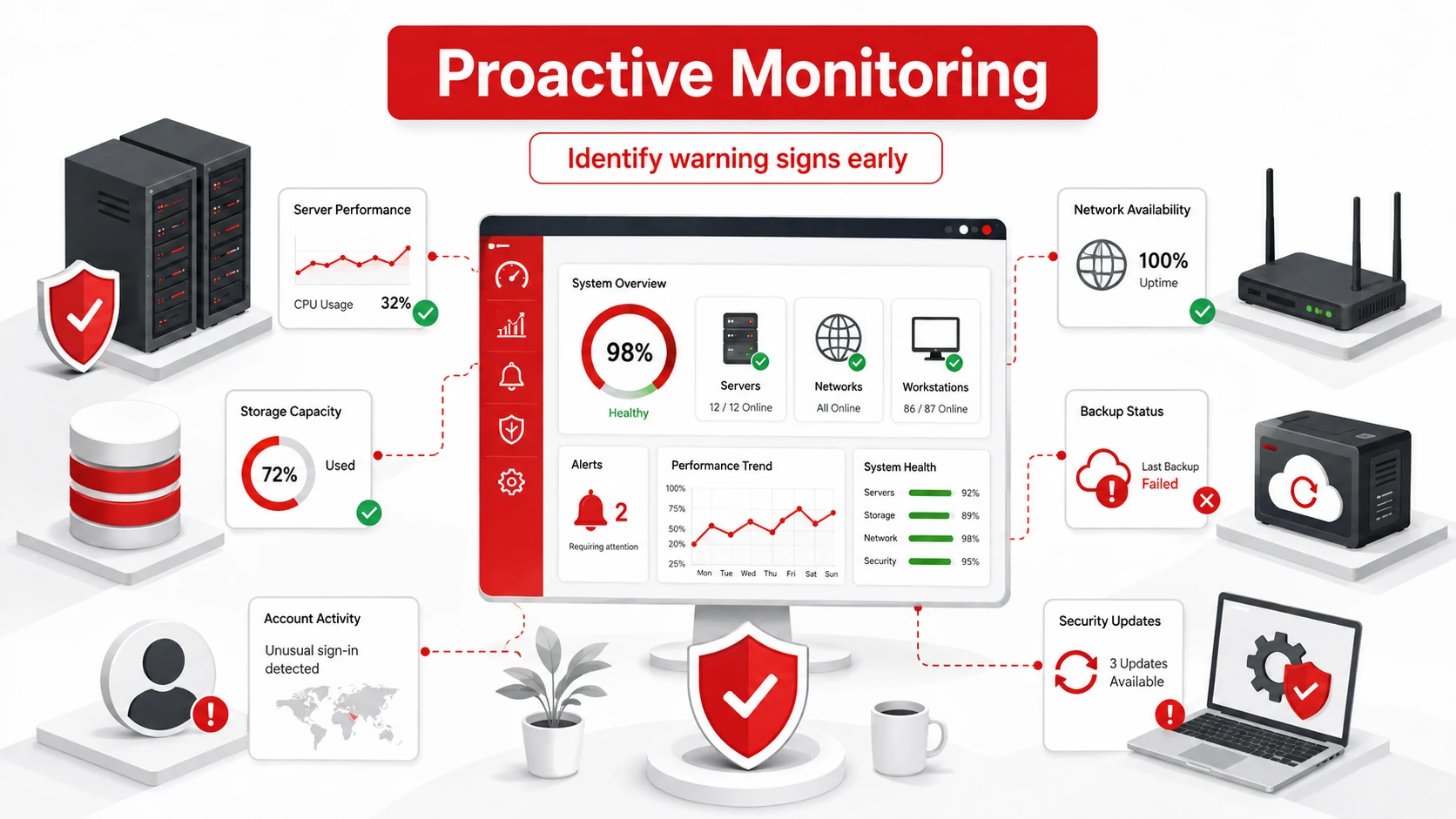
Proactive monitoring is the continuous observation of computers, servers, networks, applications, backups, and other IT systems.
Monitoring tools collect information about system health and generate alerts when performance moves outside an acceptable range. This allows an IT team to investigate warning signs before they cause a significant interruption.
Examples of proactive monitoring include:
- Tracking server performance
- Monitoring available storage
- Checking network availability
- Identifying failed backups
- Detecting unusual account activity
- Monitoring software and security updates
- Receiving alerts about equipment health
For example, a server may send an alert when its available storage falls below a set level. The IT team can remove unnecessary files or increase capacity before the server stops functioning correctly.
Businesses may use managed IT services to monitor systems continuously and respond to warning signs before they disrupt daily operations.
Monitoring can also form part of a wider proactive IT support strategy that helps maintain systems and reduce preventable downtime.
Benefits of Proactive Monitoring
Proactive monitoring helps businesses identify technical warning signs before they become serious problems. Instead of waiting for employees or customers to report an issue, the IT team can investigate alerts and take action earlier.
Key benefits include:
Fewer Preventable Outages
Monitoring can identify low storage, overloaded servers, failing equipment, and network problems before they cause a complete outage. This gives the IT team time to resolve the issue during planned maintenance.
Earlier Detection of Security Risks
Security monitoring can flag unusual login attempts, unexpected account activity, malware warnings, and other suspicious behaviour. Early detection allows the business to investigate potential threats before they cause greater harm.
More Predictable Maintenance
System data can reveal when equipment, software, or infrastructure requires attention. Businesses can schedule maintenance in advance instead of carrying out urgent repairs during working hours.
Better Capacity Planning
Monitoring helps businesses understand how storage, network bandwidth, servers, and applications are being used. This information can guide decisions about when to upgrade or expand IT resources.
Less Disruption for Employees
Technical problems can interrupt communication, delay work, and prevent employees from accessing important systems. Addressing warning signs early helps maintain reliable access to the tools employees use each day.
More Reliable Backups
Monitoring can identify failed, incomplete, or delayed backup jobs. This gives the IT team an opportunity to correct the issue before important files need to be restored.
Proactive monitoring does not prevent every technical problem, but it can reduce the number of avoidable incidents and give businesses more time to respond before operations are affected.
What Is Reactive Monitoring?
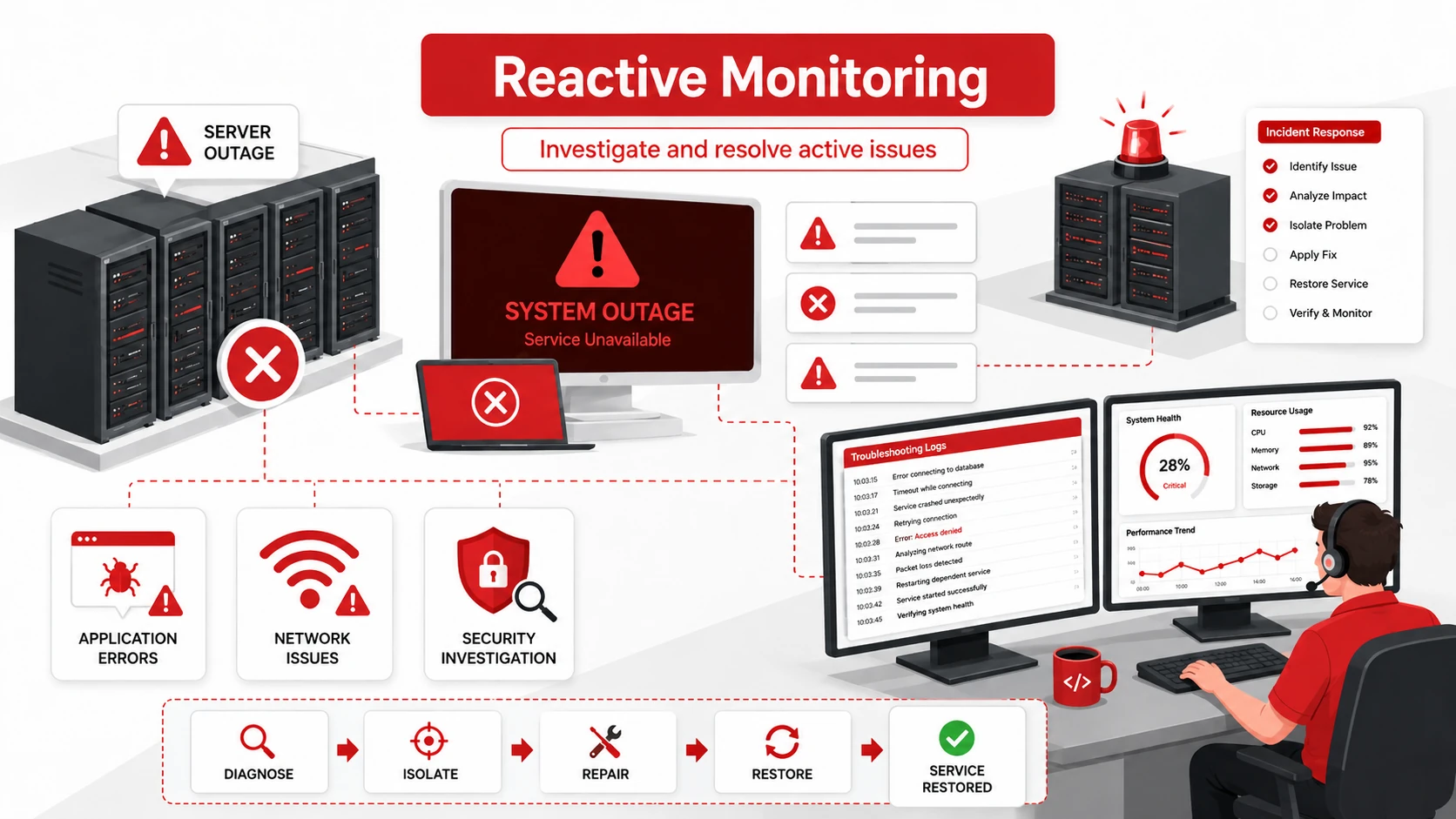
Reactive monitoring detects or investigates problems once they have already begun affecting a system or user.
The information collected during monitoring helps the IT team identify the cause of an incident and decide how to respond. Corrective action may involve restarting an application, repairing hardware, removing malware, restoring files, or resolving a network outage.
Examples of reactive monitoring include:
- Investigating a server outage
- Diagnosing a slow application
- Identifying failed equipment
- Investigating a security incident
- Examining lost network connectivity
- Reviewing errors reported by employees
For example, employees may report that they cannot access a shared application. The IT team can investigate system logs and performance data to identify the cause before restoring access.
Reactive monitoring remains essential because not every incident can be predicted. However, relying on it alone means employees, customers, or business operations may already be affected before action begins.
Is Proactive Monitoring Better Than Reactive Monitoring?
Proactive monitoring is generally more effective for reducing avoidable downtime, but it does not remove the need for reactive support.
Monitoring tools cannot predict every hardware failure, software error, cyberattack, or external service interruption. Unexpected incidents can still occur even when systems are monitored closely.
A complete IT support strategy should use both approaches:
- Proactive monitoring identifies risks and warning signs before disruption occurs.
- Reactive monitoring investigates incidents that could not be prevented.
The goal is to prevent predictable problems while maintaining a clear response process for unexpected events.
Examples of Proactive and Reactive Monitoring
| Scenario | Proactive Approach | Reactive Approach |
| Storage capacity | An alert warns that a server is approaching its storage limit. | The server runs out of space and stops processing files. |
| Hardware health | Monitoring identifies signs that a storage drive may be failing. | The drive fails and makes files or applications unavailable. |
| Cybersecurity | Security tools detect unusual login activity and generate an alert. | The business investigates after an account has been compromised. |
| Data recovery | Backup jobs are monitored and recovery tests confirm files can be restored. | Files are restored after deletion, equipment failure, or a cyber incident. |
Proactive security monitoring should support broader cybersecurity services that protect devices, accounts, applications, and business data.
A documented data backup and disaster recovery plan can also help a business restore files and systems more efficiently after a serious disruption.
Frequently Asked Questions
What Is the Difference Between Proactive and Reactive Monitoring?
Proactive monitoring identifies warning signs before a failure occurs. Reactive monitoring detects and investigates problems after they have already affected a system or user.
What Is an Example of Proactive Monitoring?
Receiving an alert when a server is running low on storage is an example of proactive monitoring. The issue can be addressed before the server stops operating correctly.
Is Reactive Monitoring Still Necessary?
Yes. Monitoring cannot predict every technical problem. Reactive monitoring is needed to investigate unexpected equipment failures, software errors, security incidents, and service outages.
Why Should Businesses Use Both Approaches?
Using both approaches helps businesses prevent predictable problems while maintaining a reliable response process for incidents that cannot be avoided.
Strengthen Your IT Monitoring
Effective IT monitoring requires suitable tools, properly configured alerts, experienced technical support, and a clear incident-response process.
Adivi can monitor your computers, servers, networks, applications, backups, and security systems while providing responsive support when unexpected problems occur.
Contact Adivi to discuss proactive monitoring and managed IT support for your business.