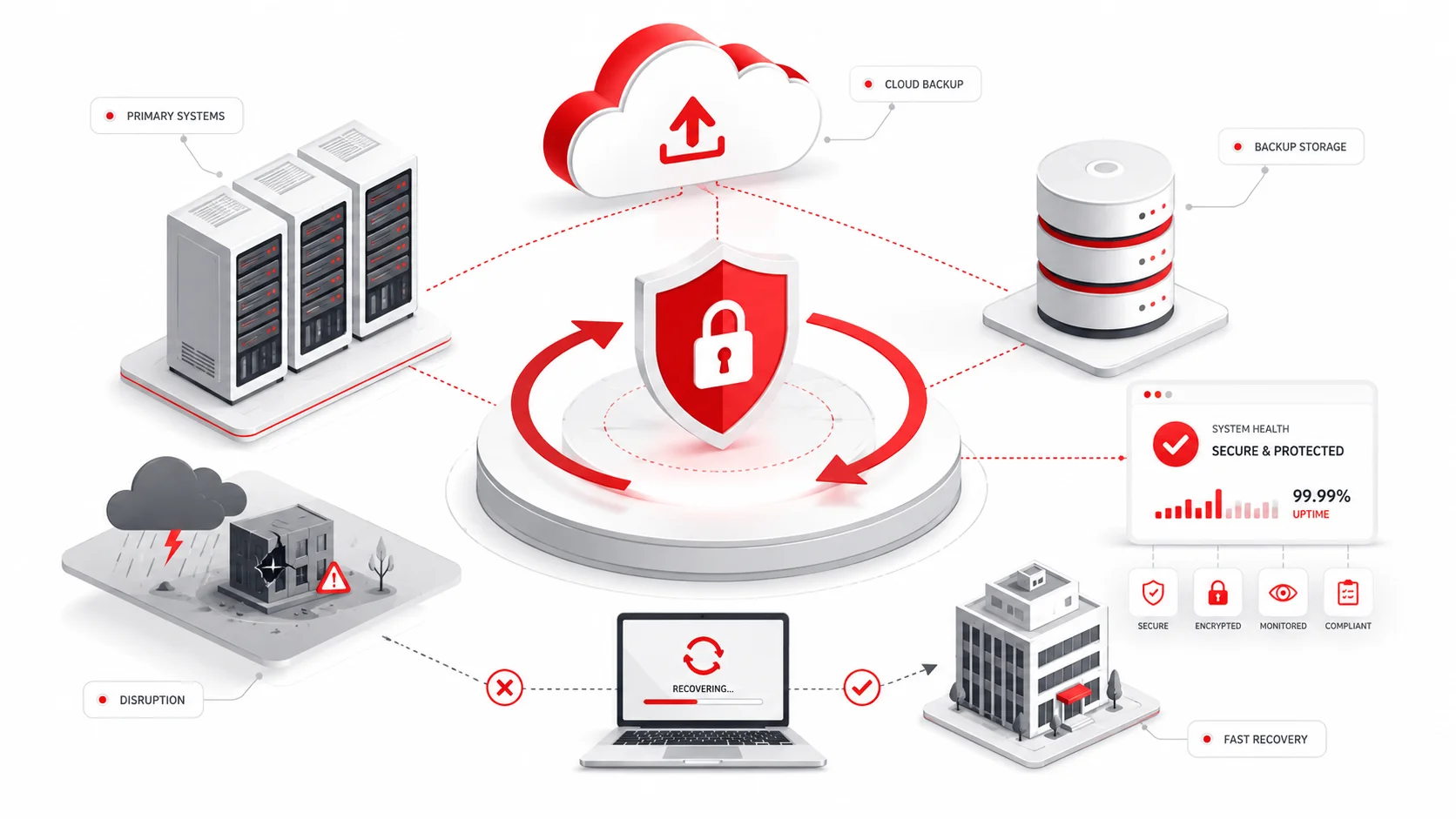
Data backup and recovery strategies help businesses protect critical information, reduce downtime, and restore systems after disruptions, while data backup and disaster recovery services in Springfield can provide local businesses with ongoing protection and recovery support.
An effective strategy defines what data must be protected, how often backups should run, where copies should be stored, and how quickly systems must be restored. It should also include security controls, monitoring, documented recovery procedures, and regular testing.
Key Takeaways
- Identify the data, applications, and systems that are most important to business operations.
- Choose backup methods based on storage requirements, backup speed, and recovery needs.
- Maintain backup copies in separate locations rather than relying on one storage environment.
- Protect backups with encryption, access controls, monitoring, and secure authentication.
- Test recovery procedures regularly to confirm that files and systems can be restored.
- Use recovery time and recovery point objectives to guide backup frequency and recovery planning.
Core Elements of a Backup Strategy
A reliable backup strategy should address the following areas.
Critical Data and Systems
Identify the files, databases, applications, and infrastructure required for essential operations. High-priority systems may need more frequent backups and faster restoration than archived or lower-priority information.
Backup Frequency
Set backup schedules according to how often data changes and how much data loss the business can tolerate.
Frequently updated systems may require several backups each day, while less active data may only need daily or weekly protection.
Retention Periods
Retention periods determine how long backup copies remain available. Maintaining several restore points can help recover information that was deleted, corrupted, or compromised before the problem was discovered.
Security Controls
Professional cybersecurity services can help protect backup copies with encryption, restricted access, multifactor authentication, and separation from production systems.
Where appropriate, businesses should also consider isolated, offline, or immutable backup copies that cannot be easily altered or deleted.
Monitoring and Alerts
Backup systems should notify responsible staff when a scheduled job fails, storage capacity is limited, or a backup cannot be completed.
Monitoring allows problems to be addressed before a recovery attempt becomes necessary.
Choosing the Right Backup Type
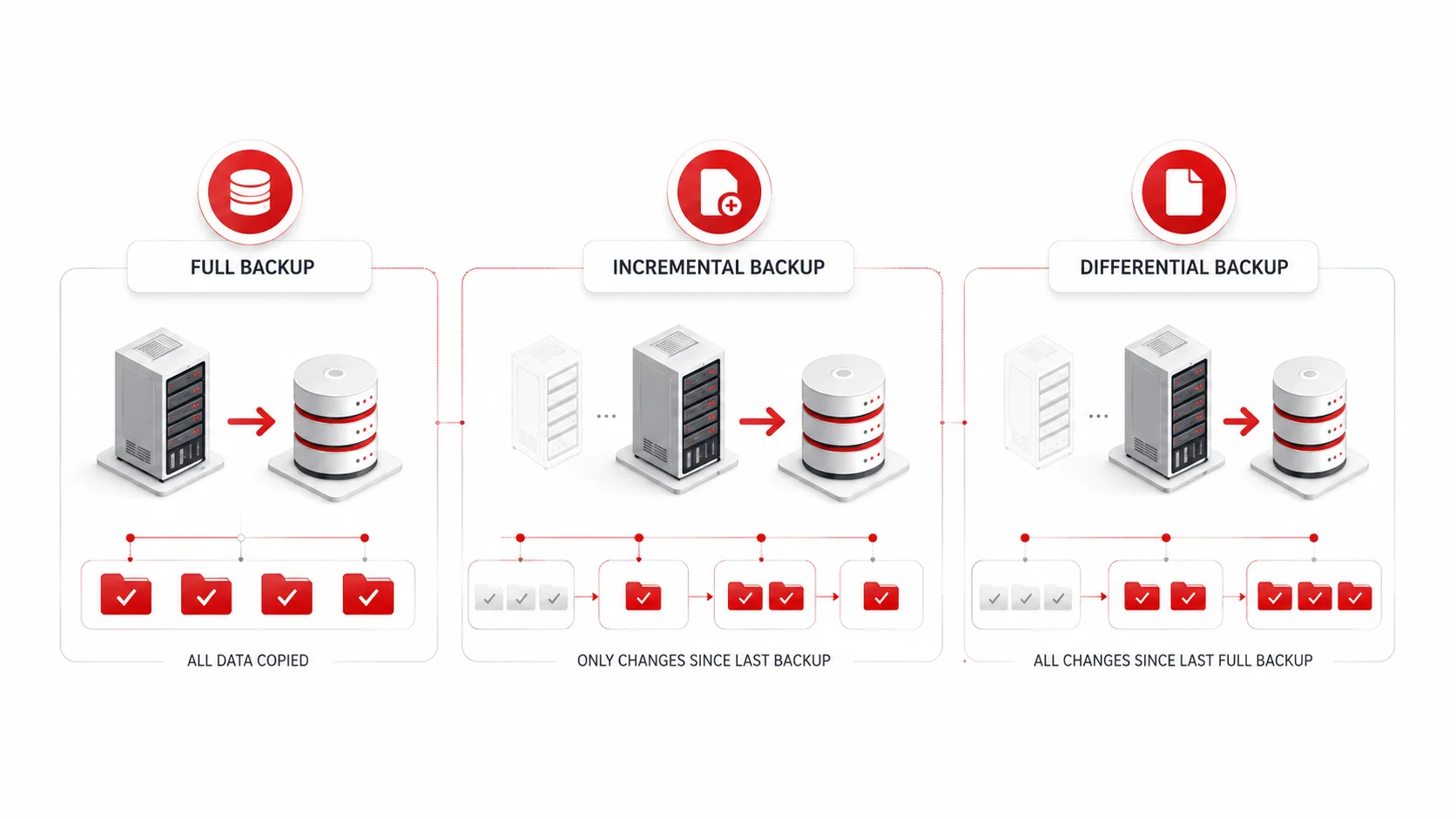
Full, incremental, and differential backups provide different balances of storage use, backup time, and recovery speed.
Full Backup
A full backup copies all selected data.
It generally provides the simplest restoration process because recovery can be completed from one full backup set. However, it requires more storage and takes longer to run than other backup methods.
Incremental Backup
An incremental backup copies only data that has changed since the most recent backup.
It uses less storage and can be completed quickly, but recovery may require the latest full backup and every incremental backup created afterward.
Differential Backup
A differential backup copies all changes made since the latest full backup.
It usually requires more storage than an incremental backup but offers a simpler recovery process because restoration generally needs only the latest full backup and the most recent differential backup.
Many businesses use periodic full backups with incremental or differential backups between them.
| Backup Type | What It Copies | Storage Use | Recovery Process |
| Full | All selected data | Higher | Usually the simplest |
| Incremental | Changes since the most recent backup | Lower | May require the full backup and every later incremental backup |
| Differential | Changes since the latest full backup | Moderate | Usually requires the latest full and differential backup |
Choosing Where to Store Backups
Backup copies may be stored locally, offsite, in the cloud, or across a combination of environments.
Local Backups
Local backups can provide fast access and restoration because the data is stored close to the original systems.
However, hardware failure, theft, fire, flooding, or a cyberattack may affect both the production environment and nearby backup storage.
Offsite Backups
Offsite backups protect information from incidents that affect the primary business location. They may be stored in another office, data centre, or geographically separate facility.
Cloud Backups
Professional cloud computing services can provide scalable backup storage, automation, remote access, and geographic separation.
Businesses should evaluate security, bandwidth, recovery speed, retention policies, provider reliability, and long-term costs before selecting a cloud solution.
Use Multiple Locations
Avoid storing every backup copy in the same physical location or network environment.
Using separate storage locations reduces the chance that one incident will affect both live systems and all available recovery copies.
Recovery Time and Recovery Point Objectives
Recovery time objective and recovery point objective help define how quickly systems must be restored and how much data loss is acceptable.
Recovery Time Objective
Recovery time objective, or RTO, is the maximum acceptable amount of time required to restore an application, system, or business process after disruption.
A shorter RTO may require faster storage, automated recovery tools, replicated infrastructure, or additional technical resources.
Recovery Point Objective
Recovery point objective, or RPO, is the maximum acceptable amount of data loss measured in time.
For example, an RPO of four hours means the backup schedule should allow the business to restore data from no more than four hours before an incident.
A lower RPO generally requires more frequent backups.
How to Build a Backup and Recovery Plan
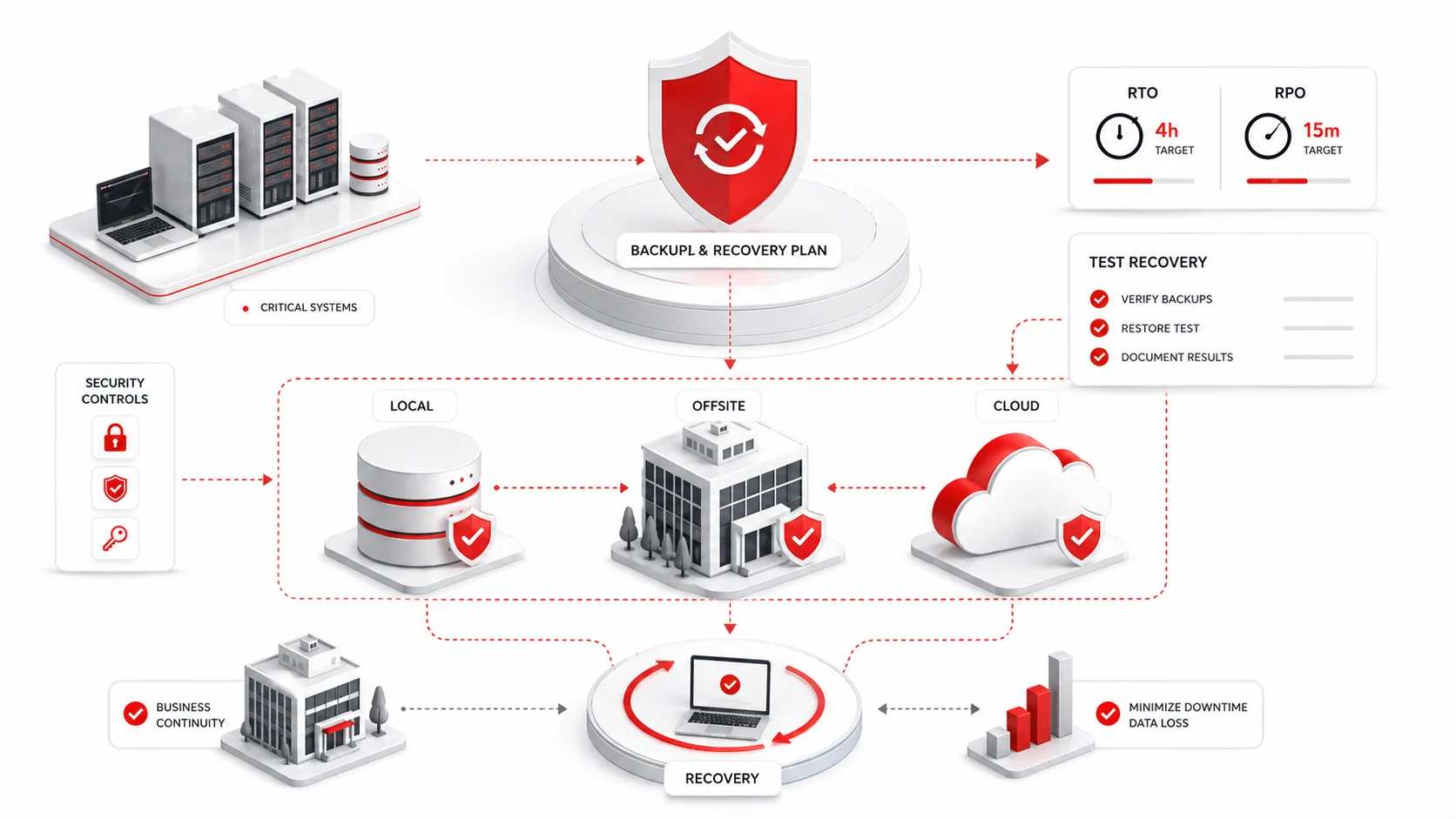
1. Identify Critical Information
Document the files, applications, databases, and systems needed to maintain essential operations.
2. Set Recovery Requirements
Determine how much downtime and data loss the business can accept for each critical system.
3. Select Backup Methods
Choose full, incremental, differential, or combined backup methods based on storage capacity, backup windows, and recovery requirements.
4. Choose Storage Locations
Decide which backups will be stored locally, offsite, or in the cloud. Avoid relying on only one location.
5. Establish Schedules and Retention
Define when backups will run and how long daily, weekly, monthly, or annual copies will remain available.
6. Secure the Backups
Apply encryption, restricted permissions, multifactor authentication, monitoring, and isolated or immutable storage where appropriate.
7. Document Recovery Procedures
Record the steps required to restore files, applications, servers, and systems. Assign responsibilities to specific employees or service providers.
8. Test the Plan
Perform recovery tests to confirm that backup copies are complete, accessible, and usable.
Maintaining the Strategy
A successful backup job does not guarantee that recovery will work as expected.
Businesses should test:
- Individual file restoration
- Database and application recovery
- Server or system restoration
- Access to offsite and cloud backups
- Employee roles and recovery procedures
- Whether recovery can meet defined RTO and RPO targets
Testing may uncover damaged files, incomplete backups, missing credentials, configuration problems, or recovery steps that take longer than expected.
The strategy should also be reviewed when:
- New systems or applications are introduced
- Data volume increases
- Staff responsibilities change
- The business moves to a new location
- Security risks evolve
- Contractual or regulatory requirements change
- Recovery tests reveal weaknesses
Final Thoughts
An effective data backup and recovery strategy combines appropriate backup methods, secure storage, clear recovery objectives, and regular testing. The right approach depends on the value of the data, how frequently it changes, and how quickly the business must resume operations.
Adivi’s data backup and disaster recovery services can help businesses protect critical information, maintain reliable backup copies, and develop a recovery strategy suited to their systems and operational needs.
FAQs
What is a data backup and recovery strategy?
It is a documented plan that explains which data will be protected, how often backups will run, where copies will be stored, and how files and systems will be restored after disruption.
What are the main types of data backup?
The main types are full, incremental, and differential backups. Many businesses combine these methods within one backup schedule.
How often should a business back up its data?
Backup frequency should depend on how often the data changes and how much data loss the business can tolerate. Critical systems may require more frequent backups than archived information.
Why should backups be tested?
Testing confirms that backup copies are complete, accessible, and capable of being restored. It also helps identify technical problems before an actual disruption occurs.
Where should businesses store backups?
Businesses should generally maintain copies in more than one location, such as local storage combined with secure offsite or cloud storage.
What is the difference between backup and recovery?
Backup is the process of creating protected copies of data. Recovery is the process of restoring those copies when files, applications, or systems become unavailable.